 lumenfix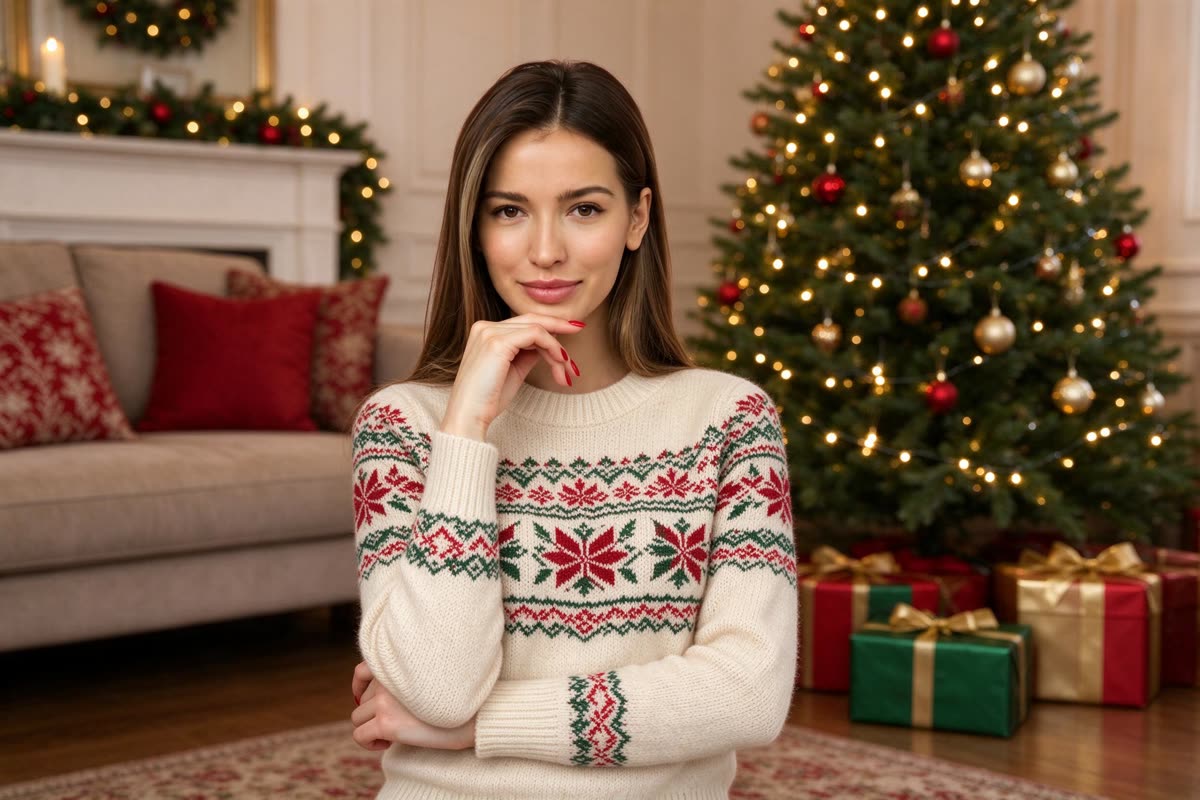

Real result
Portrait, Christmas tree
A studio portrait on a pink wall. The face, hair, and hand pose stayed the same. The dress became a cream Christmas sweater, and the wall became a living room with a tree.
Free · no account required
Upload one photo of yourself, your family, or friends. Pick a Christmas tree or snow scene, and the same people appear in it in festive clothes.
A portrait in both scenes, a group of five in the snow, and an old family print we restored first, in both scenes. Every after side is a real Standard result. Drag the slider and read what changed.
A studio portrait on a pink wall. The face, hair, and hand pose stayed the same. The dress became a cream Christmas sweater, and the wall became a living room with a tree.
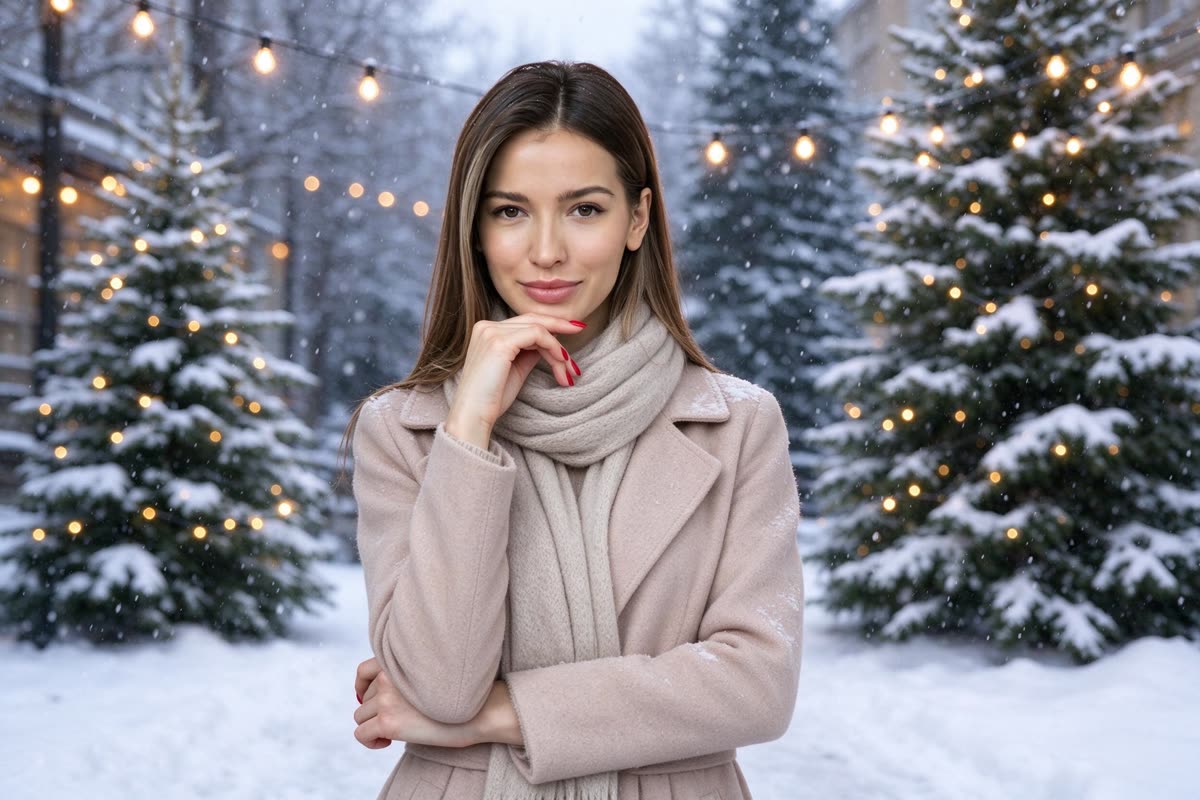
The same portrait in the snow scene. Face, hair, and pose stayed the same; she now wears a beige coat and a scarf among snowy pines.


Five coworkers around a table. All five stayed in their places, with the same faces, laptops, and papers. The office became a snowy garden, and everyone got a coat and a scarf.
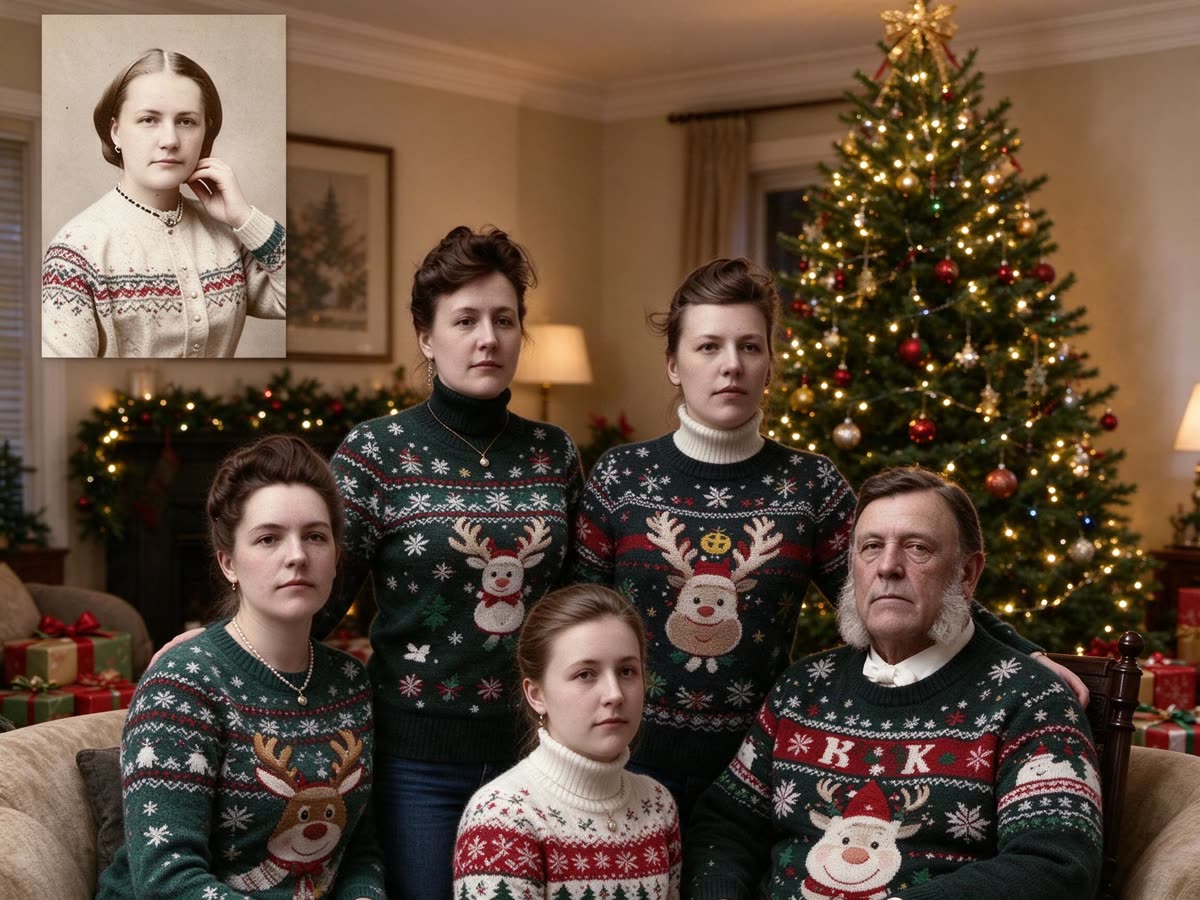
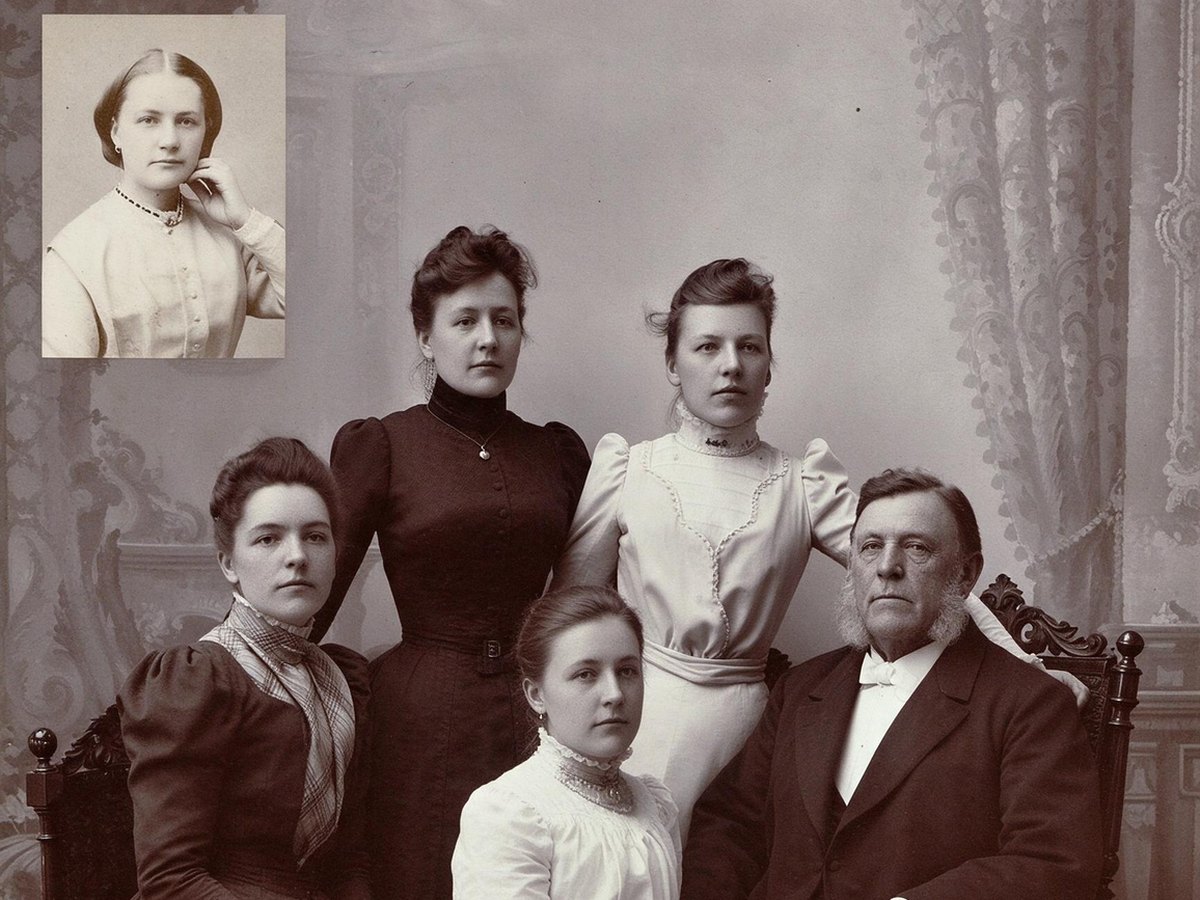
A sepia family print we repaired on Photo Restoration first. The result is in color, and the five faces stayed close to the print. Everyone got a reindeer sweater. The small inset portrait got a sweater too, and the father's sweater has stray letters.
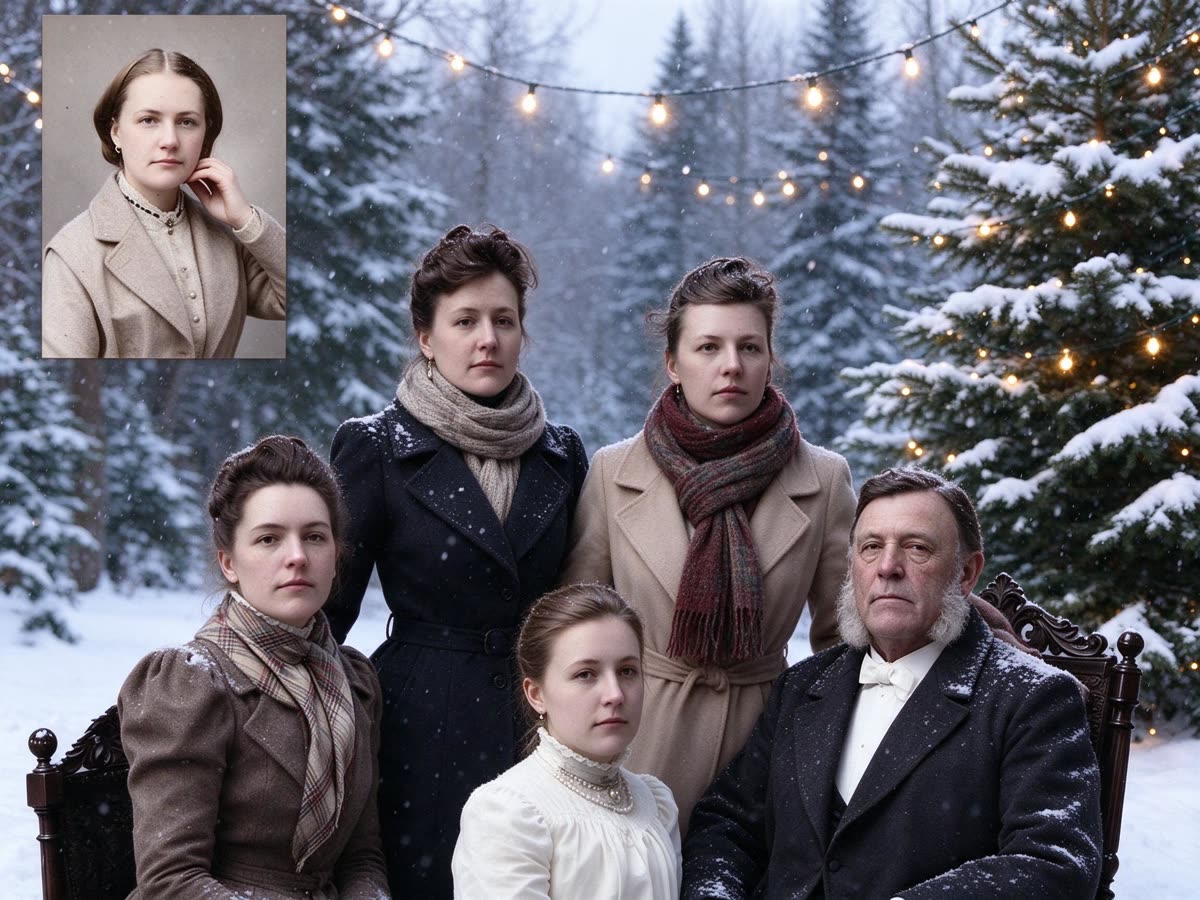
The same restored print in the snow scene. Color, coats, and scarves were added, and the five faces stayed close to the print. The girl in front kept her lace blouse, and the inset portrait got a coat.
Step 1
Christmas tree puts everyone in a decorated living room in Christmas sweaters. Snow puts them outdoors in coats and scarves.
Step 2
A JPG, PNG, or WebP up to 15 MB, with faces clear and not too small. The run starts as soon as the photo is uploaded and uses your daily free credits when you still have them.
Step 3
Drag the slider and check every face. Each run comes out a little different, so run it again if a face or a pose looks off.
It keeps the people in your photo, swaps the background for a Christmas scene, and changes their clothes to match. You need one photo, not a set of selfies, and there is no prompt to write.
Last December's AI Christmas photo trend had people upload a selfie to ChatGPT and paste a long prompt. This page does the same job without a prompt: pick a scene and upload. If you'd rather write your own, start with our ChatGPT Christmas photo prompts, each tested on a real photo.
It works with one person or a group. In our tests, a group of five kept the same people in the same places.
Black-and-white and sepia photos come out in color. To turn an old family print into a Christmas photo, repair it on Photo Restoration first, then bring it here.
In our tests, a run took about 20 seconds.
Clear portraits, couples, family photos, groups of friends or coworkers, and restored old family prints. Each card below is a real Standard result and says what changed.
One upload, one scene, one result. It adds a Christmas background to your photo and changes the outfits; the people stay.
01
A decorated living room with a tree, string lights, and wrapped presents. Everyone gets a Christmas sweater.
02
Outdoors in falling snow, with snow-covered pines and string lights. Everyone gets a winter coat and a scarf.
03
Pick a scene and upload one photo. There is nothing to write and nothing to train.
04
A free run exports a JPG up to 2048 px on the long side, with no watermark. A Pro subscription uses the same model at the same credit cost and can download the model's full output.
Every after side is a real Standard run, not a retouched picture. Two start from a portrait, one from a group of five, and two from an old family print we restored first. Each card says what changed.
A studio portrait on a pink wall. The face, hair, and hand pose stayed the same. The dress became a cream Christmas sweater, and the wall became a living room with a tree.
The same portrait in the snow scene. Face, hair, and pose stayed the same; she now wears a beige coat and a scarf among snowy pines.
Five coworkers around a table. All five stayed in their places, with the same faces, laptops, and papers. The office became a snowy garden, and everyone got a coat and a scarf.
A sepia family print we repaired on Photo Restoration first. The result is in color, and the five faces stayed close to the print. Everyone got a reindeer sweater. The small inset portrait got a sweater too, and the father's sweater has stray letters.
The same restored print in the snow scene. Color, coats, and scarves were added, and the five faces stayed close to the print. The girl in front kept her lace blouse, and the inset portrait got a coat.
These are tips for the photo you upload. They are not a promise about the result.
Faces in focus and facing the camera come through best. Tiny faces in a wide shot drift more.
A tighter crop gives each face more pixels. Crop a wide group shot before you upload it.
Scratches and stains carry into the new scene. Repair them on Photo Restoration first.
Each run is different. If one face or pose looks off, run the same photo again before you change anything else.
If you're happy with the result, it's ready to save. If you also want to upscale, extend the edges, or refine other details, you can continue with:
Enhance
5General AI image enhancement. Standard 2×, Pro for finer detail and color.
Free · Pro
Sharpen blurry text and screenshots cleanly.
Free · Pro
Take glare off glasses, camera flash, and sun.
Free · 4 credits
Repair scratches, creases, and tears on an old print.
Free · 4 credits
Add natural, lifelike color to black-and-white photos.
Free · Pro
Restyle
5Put the people in your photo into a Christmas scene.
Free · 4 credits
Turn a photo into an oil painting or watercolor.
Free · 4 credits
Turn a photo into a pencil drawing.
Free · 4 credits
Turn a photo into a page to print and color.
Free · 4 credits
Turn a photo into a cartoon.
Free · 4 credits
Upscale & extend
2Free convert
10Convert WebP images to lossless PNG.
Free
Convert JFIF files to standard JPG format.
Free
Convert AVIF images to standard JPG format.
Free
Optimize PNG images into lightweight WebP.
Free
Convert JPG photos to lightweight WebP.
Free
Convert JPEG stills to WebP for the web.
Free
Convert WebP images to standard JPG.
Free
Convert WebP images to JPEG files.
Free
Convert PNG stills to smaller JPG photos.
Free
Convert JPG photos to PNG for editing.
Free